 Zency Scan
- Open Settings
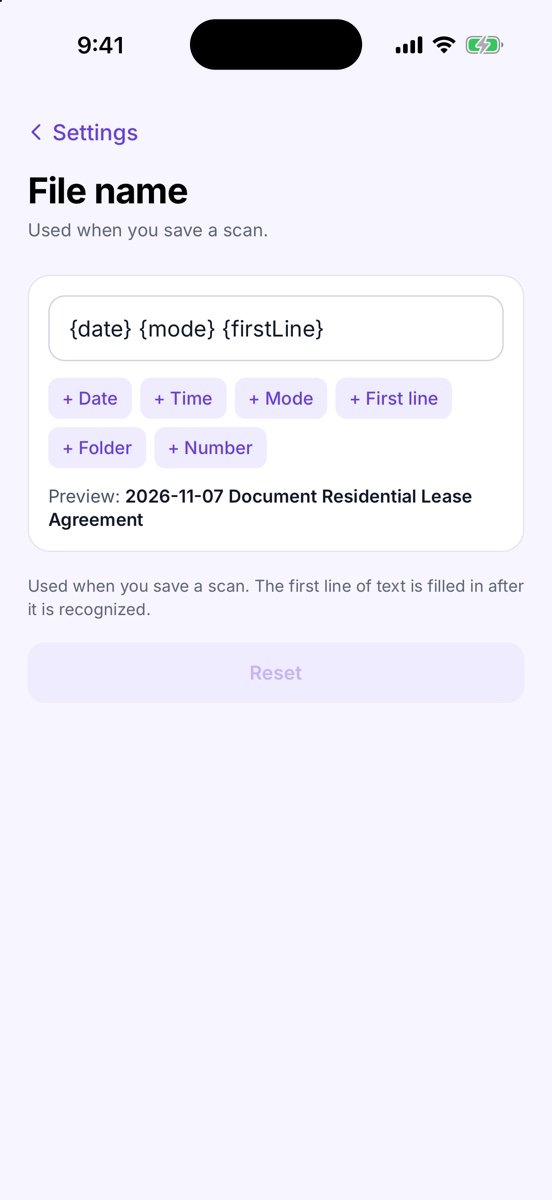
Tap Settings → File name.
- Build the pattern
Edit the box (default {date} {mode} {firstLine}) or insert parts with + Date, + Time, + Mode, + First line, + Folder and + Number.
- Check the preview
Preview: shows a sample name. Reset goes back to the default.
- Scan as usual
When you save, the name is filled in and marked Suggested by your file name template. You can still type over it.
Tips
- The first line is the first line with at least three words, so dates and page numbers are skipped. A one-letter logo can still count as a word — edit the name if it looks odd.
- The first line is filled in once the text has been recognized.
Free or Pro? Automatic names are a Pro feature. It is included while you add your first 20 pages, so you can try it on a real document; after that it needs Lifetime Pro ($7.99 once, no subscription).
See it in a real situation: Freelancers: sign and return a contract without a printer.