 Zency Scan
Merge PDF free — combine PDF files without uploading
Combine several PDFs into one, in the order you choose. The merge runs in this browser tab, so your files never leave your device.
Your files never leave this device — nothing is uploaded.
How to use it
- Tap Choose PDF files and pick two or more PDFs. On iPhone they open from Files or iCloud Drive; on Android from Files, Google Drive or Downloads.
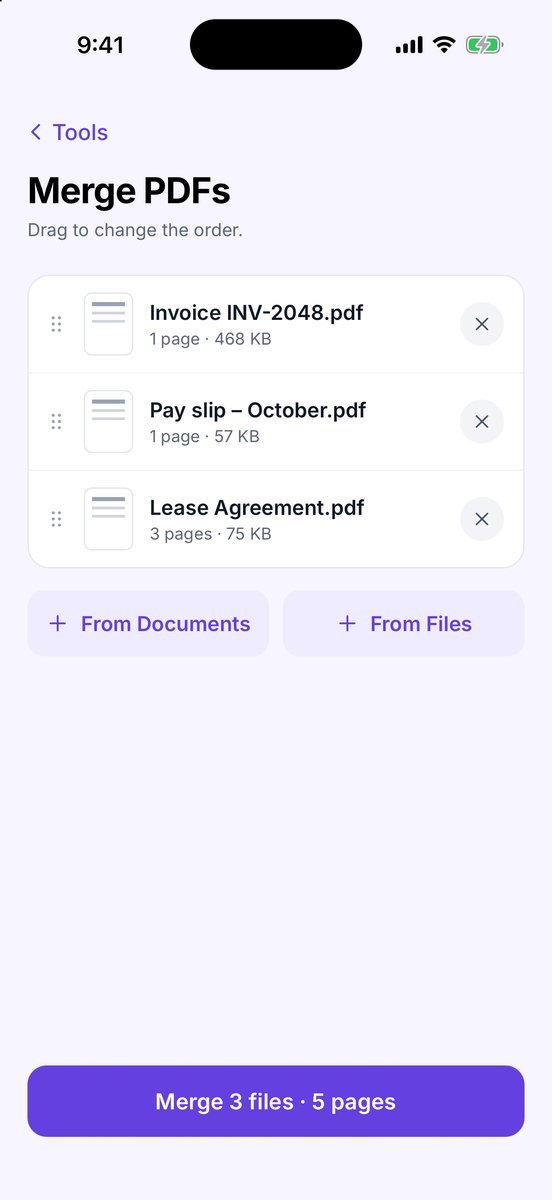
- Put them in order with ↑ and ↓. The button shows how many files and pages you are joining.
- Tap Merge, then Download PDF. On iPhone the PDF opens in a preview — tap Share → Save to Files.
Private by design
Most online PDF sites upload your file to their servers to process it. This tool doesn't: the work happens inside your browser with open-source libraries hosted on this site, and the result is created on your device. There is no account, no email and no tracking of your files.
Zency Scan's Merge PDFs is free, works offline, and picks files from your scans or from Files — with password support and drag-to-reorder.

Common questions
Is this PDF merger really free?
Yes. No sign-up, no watermark and no daily limit. The only limit is your device's memory — very large files (hundreds of MB) may be slow on older phones.
Are my PDFs uploaded to a server?
No. The page loads an open-source PDF library (pdf-lib) from this site and merges the files inside your browser. Once the page has loaded you can even turn on airplane mode.
Can I merge password-protected PDFs?
Not in the browser tool — remove the password first. The Merge PDFs tool in the Zency Scan app asks for the password and carries on.
Is it safe to merge sensitive PDFs like payslips or contracts here?
Yes — that's what this tool is built for. The files are read and combined on your own device, so nothing is sent to us or anyone else. Close the tab and nothing is left behind.
Is anything lost when I merge?
The pages are copied as they are. Bookmarks and fillable form fields from the original files may not carry over, and a digital signature is no longer valid in the merged copy.
- How to merge PDFs on your phone without uploading them — every way to do it on iPhone and Android.
- Merge PDFs in the Zency Scan app — step by step.
- JPG to PDF — Merge photos and screenshots into one PDF.
- PDF to JPG — Save each page of a PDF as a JPG image.
- ID card to PDF — Both sides of an ID card on one printable page.