 Zency Scan
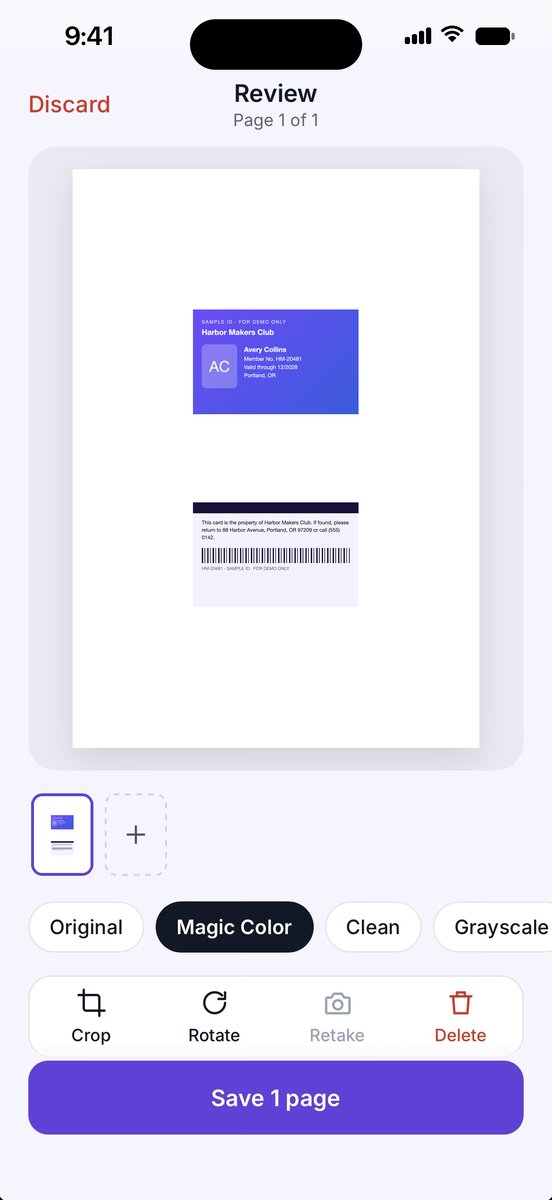
ID card front and back on one page — free
Add a photo of each side and get one A4 or Letter PDF with both sides at real card size (85.6 × 54 mm), ready to print or attach. Nothing is uploaded.
Your files never leave this device — nothing is uploaded.
How to use it
- Take a photo of the front and of the back, and crop each photo to the card's edges (Photos → Edit → Crop). Shoot from straight above, without flash glare.
- Add them under Front and Back, and pick A4 or Letter.
- Tap Make PDF and download it. When printing, choose Actual size / 100%, not “Fit to page”, so the copy is the size of the real card.
Private by design
Most online PDF sites upload your file to their servers to process it. This tool doesn't: the work happens inside your browser with open-source libraries hosted on this site, and the result is created on your device. There is no account, no email and no tracking of your files.
Zency Scan's ID Card (2 sides) mode scans the front, then the back, crops both automatically and lays them out on one A4 page at real size — free and offline.

Common questions
Is the copy really the size of the card?
Yes, as long as each photo is cropped to the card's edges. Cards are placed at 85.6 × 54 mm, the ID-1 size used by driver's licenses, most national ID cards and bank cards. Print at 100%.
How do I copy my ID for a rental application, HR or a background check?
Photograph both sides, crop them to the card, add them here and download the PDF. That one page is what most landlords, employers and screening companies mean by “a copy of your ID, front and back”.
Are my ID photos uploaded?
No. The PDF is built in your browser — your ID never leaves your device. That matters more for an ID than for almost any other document.
Can it straighten and crop the photo for me?
Not in the browser. The ID Card (2 sides) mode in the Zency Scan app finds the card's edges, straightens it and builds the same page automatically — free.
Should I hide my ID number?
If the person asking doesn't need it, yes. Many people cover part of the number or write the purpose (“Copy for ABC Rentals only”) across the copy. The Zency Scan app can redact the number before you send it.
Does it work for Aadhaar, PAN, a driver's license or a national ID?
Yes — any card-sized ID (85.6 × 54 mm, the standard ID-1 size): Aadhaar PVC and PAN cards, driver's licenses, national ID cards, residence permits and health insurance cards. The result is the same as a photocopy (xerox) of the front and back on one A4 or Letter page.
- How to scan an ID card front and back on one page — every way to do it on iPhone and Android.
- ID Card (2 sides) mode in the Zency Scan app — step by step.
- Merge PDF — Combine several PDFs into one file, in any order.
- JPG to PDF — Merge photos and screenshots into one PDF.
- PDF to JPG — Save each page of a PDF as a JPG image.