 Zency Scan
How to scan an ID card front and back on one page
Banks, landlords and HR often want both sides of your ID or driver's license on one page. Here's how to do it on iPhone or Android, at real card size, for free.
Use a scanner app with an ID card mode, like the free ID Card (2 sides) mode in Zency Scan: scan the front, flip the card, scan the back, and both sides land on one A4 page at real card size. No app? Take a cropped photo of each side and use our free ID card to PDF tool in the browser.
Why they want both sides on one page
“Please send a copy of your ID, front and back” shows up in rental applications, bank and broker sign-ups, HR onboarding, visa and school forms. One page with both sides is what an office would make on a photocopier: easy to print, easy to file, and the card is shown at its real size so nobody can claim it was stretched or cropped.
Two loose phone photos don't do that. They are huge, often sideways, include your kitchen table, and get separated the moment someone saves the attachments.
Your options compared
| Method | Both sides on one page? | Real card size? | Cost |
|---|---|---|---|
| Zency Scan — ID Card (2 sides) | Yes, automatically | Yes, auto-cropped | Free |
| Free ID card to PDF tool (any browser) | Yes | Yes, if you crop the photos | Free, no upload |
| Notes on iPhone / Google Drive scan on Android | No — two separate pages | No — each side fills a page | Free |
| Photocopier at the office or library | Yes, by hand | Yes | Paper and a trip |
The built-in scanners in Notes and Google Drive are great for letters, but they stretch each side of a small card to fill a whole page and save the two sides as two pages. That's the opposite of what was asked.
Method 1 — The ID Card mode in Zency Scan (iPhone & Android)
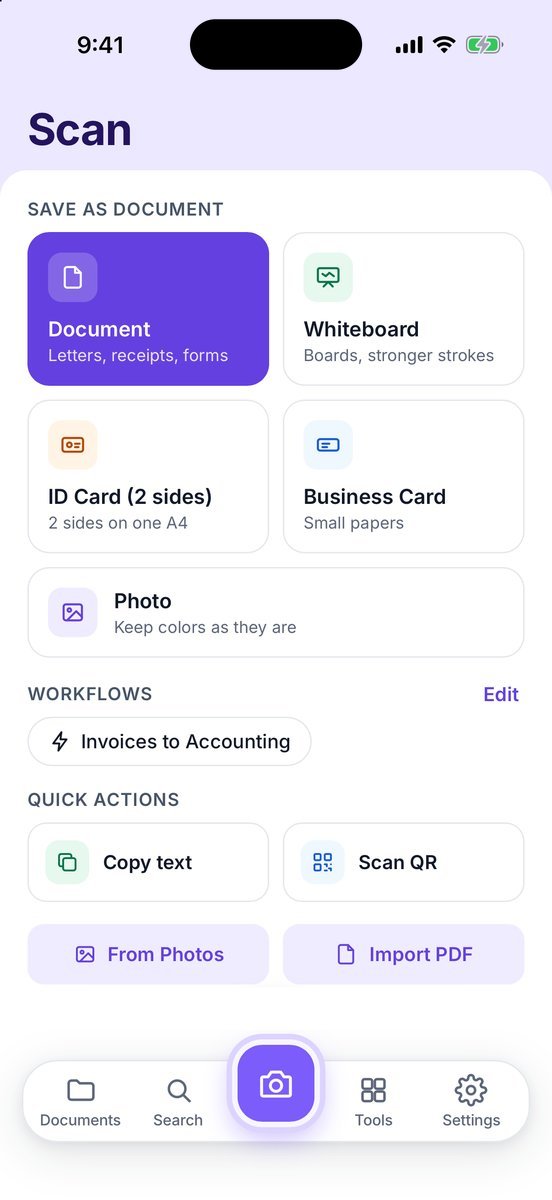
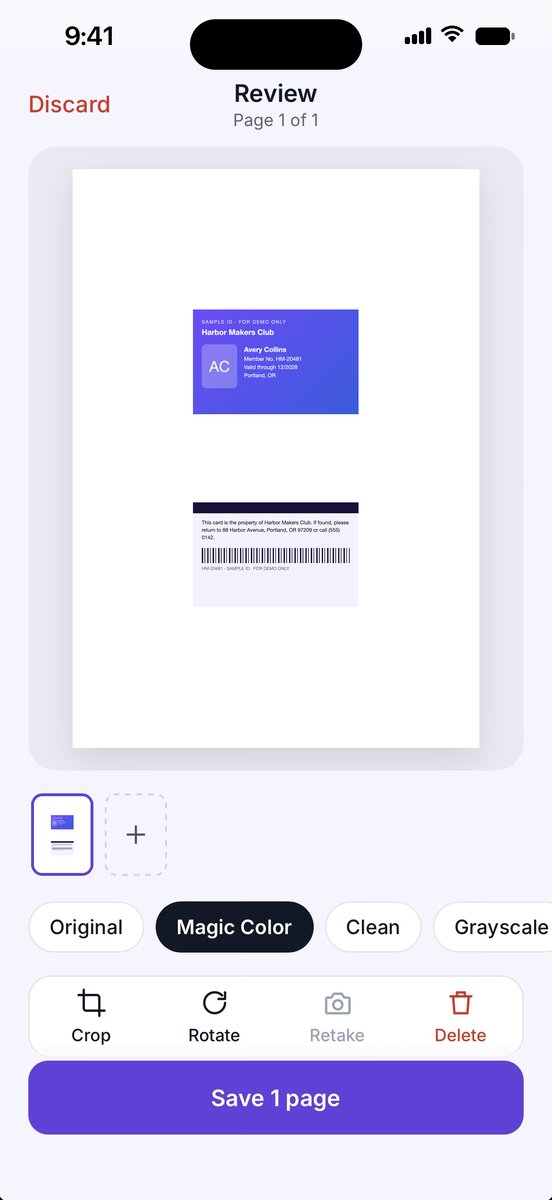
- Open Scan and tap ID Card (2 sides).
- Step 1 of 2: scan the front. The app finds the card's edges and straightens it. You can also tap Choose a photo if you already have one.
- When you see Front scanned, flip the card — Step 2 of 2: scan the back.
- Both sides appear on one A4 page at real card size. Pick a filter (Magic Color keeps the colors, B&W is good for faxes and forms) and tap Save.
- Share it as PDF or JPG. Set File size → Under 1 MB if the upload form is picky.
The ID Card mode is free with no watermark, works offline, and the scan never leaves your phone unless you share it. Step-by-step with screenshots: Choose a scan mode.
Method 2 — No app: the free browser tool
- Take a photo of each side from straight above, on a dark background, with no flash glare.
- Crop each photo to the edges of the card (Photos → Edit → Crop on iPhone, or the editor in Google Photos).
- Open the ID card to PDF tool, add the front and the back, choose A4 or Letter and tap Make PDF.
The tool places each side at 85.6 × 54 mm — the standard (ID-1) size of driver's licenses, most national ID cards and bank cards — and builds the PDF in your browser. Your ID is never uploaded.
Printing at the right size
Whichever method you use, print with Actual size or 100% selected. “Fit to page” or “Shrink to fit” resizes the page and your copy will no longer match the real card.
Protect your ID before you send it
- Don't email the original photos — they contain more detail (and sometimes location data) than the page you meant to send.
- Delete copies you no longer need from your downloads and chat apps.
- Passports are different: the photo page is larger than an ID card. Scan it as a normal document page instead.
Common questions
What size is an ID card on paper?
Most ID cards, driver's licenses and bank cards use the ID-1 format: 85.6 × 53.98 mm (3.37 × 2.13 in). Printed at 100%, a correct copy measures the same.
Can I put both sides of my driver's license on one page on iPhone?
Yes. Use an app with an ID card mode — such as Zency Scan's free ID Card (2 sides) — or combine two cropped photos with the free ID card to PDF tool in Safari.
Is it safe to make a copy of my ID with an app?
It depends where the copy goes. Zency Scan and the browser tool on this site process the images on your device; nothing is uploaded. Many free scanner apps and PDF websites upload files to their servers — check before you use one for an ID.
Can I make the copy black and white?
Yes. In Zency Scan choose the B&W or Grayscale filter before saving. Some offices prefer color so they can see security features — ask if you're unsure.
How do I copy an ID card front and back on one page?
Put both sides on one page at real card size, then print it or send the PDF — the same result as a photocopy of the front and back. It works for any card-sized ID: a driver's license, national ID, Aadhaar or PAN card, a residence permit or a health insurance card. Use the ID Card mode in Zency Scan, or the free ID card to PDF tool in your browser.
- Digital survival kit: car records, IDs and bills — keep your IDs and the papers around them in one private place.
- Never miss a renewal date — reminders before IDs, leases, warranties and contracts expire.
- Choose a scan mode — Document, Whiteboard, ID Card, Business Card and Photo.
- Redact — Black out or blur account numbers, addresses and IDs.
- Share & export — Send as PDF or JPG with a size cap.